Announcing Supervertaler MCP Server: let Claude for Desktop work directly with your Trados project! Շարքի հրապարակողը: Michael Beijer
|
|---|
Hi guys, I just wanted to mention that I have released an MCP server that lets you connect Claude for Desktop to Trados Studio, using Supervertaler for Trados as a bridge.
Once you install the MCP server, here's an example of the kind of thing you can do in Claude for Desktop:
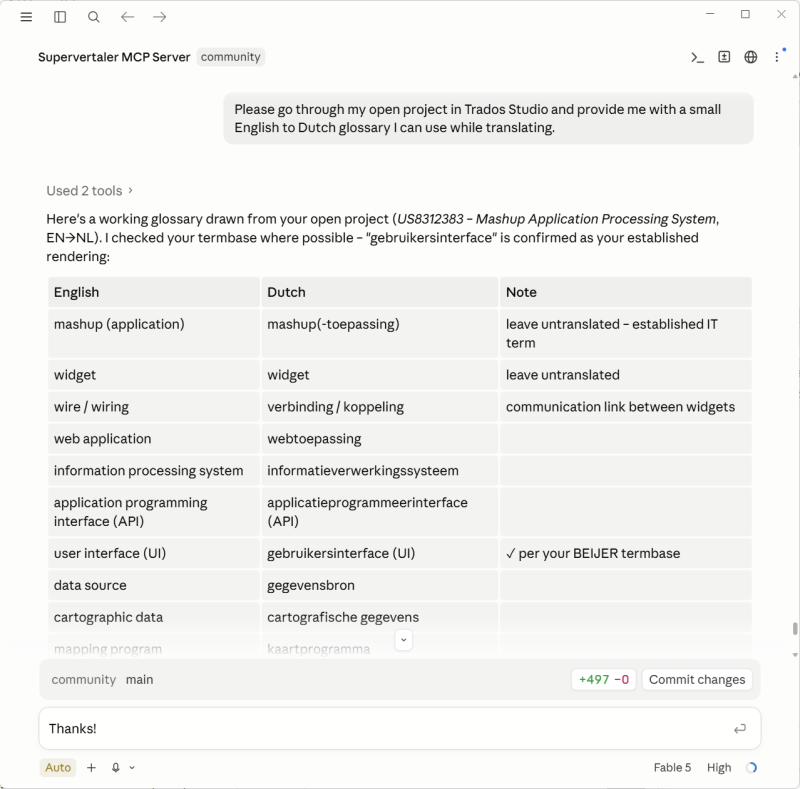
In the chat, you can basically ask Claude anything, and Claude has direct access to your actual Trados Studio project. That is, it can navigate to actual segments, edit text in segments, run all kinds of QA and other tools on your project, consult term bases and translation memories, add or remove or edit comments, etc. Playing around with this today has been absolutely insane. And the craziest thing is that I built the whole MCP server in a single day! That is, Claude Code (using Fable 5) built it, with my dictated commands via Wispr Flow.
Info here: https://docs.supervertaler.com/trados/mcp-server/
I am adding more functionality to it daily, but it is already extremely powerful. I did some proofreading of a gigantic project in Trados Studio 2026 today, and combining my new Supervertaler MCP Server with Wispr Flow for dictation has taken things to a whole new level of fun. You can simply open your CAT tool and chat with Claude on desktop.
Feel free to try it out in the latest version, which is available on the RWS AppStore and supports both Trados Studio 2024 and the new (64-bit!) Trados Studio 2026:
https://appstore.rws.com/plugin/432
Michael
| | | | Michael Beijer 
Մեծ Բրիտանիա
Local time: 07:27
Անդամ
հոլանդերեն
+ ...
TOPIC STARTER | a quick update on using the new Supervertaler MCP Server together with Trados Studio 2026! | Jul 22 |
Hi guys,
Just a quick update on this. After implementing the Supervertaler MCP Server, I started using it on real translation jobs, as follows:
• I open a project in Trados Studio 2026.
• I open a fresh chat in Claude for Desktop and give it a prompt along these lines:
------------ ---------------- --------------- ---------------- ---------------
I'm translating a project from English into Dutch, and I have it open in Trados Studio 2026. Ple... See more Hi guys,
Just a quick update on this. After implementing the Supervertaler MCP Server, I started using it on real translation jobs, as follows:
• I open a project in Trados Studio 2026.
• I open a fresh chat in Claude for Desktop and give it a prompt along these lines:
------------ ---------------- --------------- ---------------- ---------------
I'm translating a project from English into Dutch, and I have it open in Trados Studio 2026. Please analyze the project.
As you'll see, a large portion of it is already 100% and CM (context) matches – i.e. confirmed. As a rule, we can ignore any confirmed segment. Your job is to translate the rest and make sure it's consistent with the whole document.
It's also your job to make sure the whole document is consistent and correct. If you find things in already-confirmed segments that aren't correct, you can fix them.
If you find a segment that isn't confirmed, isn't set to translated, and has a high fuzzy match (say 93–95%), you can use it as a reference – but make sure to insert a 100% correct translation. Don't just copy high matches or use them without thinking.
Please also consult all the client's notes and references in this folder: D:\Example\refs
You can also look at the source document as a PDF for reference if you need it: D:\Example\Example source document.pdf
------------ ---------------- --------------- ---------------- ---------------
I then translate the project interactively in Studio, just by chatting with Claude.
I don't even touch my keyboard – I use Wispr Flow for all the communication. I keep the Claude chat window open on one monitor, with Trados Studio on my main monitor. As I talk to Claude, I can watch things update in real time in my Trados project.
If Claude is unable to do something, I simply switch to the Claude Code tab in the Claude for Desktop app and tell Claude Code to implement it. It gets to work, and I switch back to the translation chat tab to carry on. This lets me improve the system iteratively while using it to translate a real project at the same time!
If anyone would like to try this themselves, feel free to grab the trial version of Supervertaler for Trados (https://appstore.rws.com/plugin/432). If you have any questions at all, just ask me here or at [email protected]. Incidentally, the trial period is 14 days, but I would be more than happy to extend it as long as you need.
Michael
info:
https://appstore.rws.com/plugin/432 (RWS AppStore)
https://docs.supervertaler.com/trados/mcp-server/ (Docs)
https://supervertaler.com/trados/ (website)
https://github.com/Supervertaler/Supervertaler-for-Trados (GitHub repo)
[Edited at 2026-07-22 20:20 GMT] ▲ Collapse
| | | | Michael Beijer
Մեծ Բրիտանիա
Local time: 07:27
Անդամ
հոլանդերեն
+ ...
TOPIC STARTER | Claude's Fable 5 support added to both Supervertaler Workbench and Supervertaler for Trados! | Jul 23 |
PS: Supervertaler for Trados now also supports Fable 5. Although Fable 5 is very expensive, I am currently testing how it works in Supervertaler's automatic prompt generation system ("AutoPrompt"). I added Fable 5 support to both Supervertaler Workbench and Supervertaler for Trados.
My testing so far reveals that Fable 5 produces much better prompts using the AutoPrompt generation system. And the price difference is actually negligible:
Opus 4.8: $0.45
Fable 5:... See more PS: Supervertaler for Trados now also supports Fable 5. Although Fable 5 is very expensive, I am currently testing how it works in Supervertaler's automatic prompt generation system ("AutoPrompt"). I added Fable 5 support to both Supervertaler Workbench and Supervertaler for Trados.
My testing so far reveals that Fable 5 produces much better prompts using the AutoPrompt generation system. And the price difference is actually negligible:
Opus 4.8: $0.45
Fable 5: $0.85
I still need to do some testing to see if it can actually be used to translate the entire document while remaining cost-effective. However (especially for high-value jobs), it is definitely the recommended model to use for the auto-prompt syste!
[Edited at 2026-07-23 23:18 GMT] ▲ Collapse
| | | | Kaspars Melkis
Մեծ Բրիտանիա
Local time: 07:27
անգլերենից լատվիերեն
+ ...
Most interesting is that you can use simple verbal commands to control and manage Trados software instead of clicking through menus. Could it be a new way to do things? The old UI paradigm is obsolete. The future is simply asking the software to do things we want and the software does it or explains that it cannot be done and suggests ways how to do it differently!
| | |
|
|
|
Michael Beijer
Մեծ Բրիտանիա
Local time: 07:27
Անդամ
հոլանդերեն
+ ...
TOPIC STARTER | Supervertaler MCP Server + Trados Studio feels like a paradigm shift | Aug 9 |
Kaspars Melkis wrote:
Most interesting is that you can use simple verbal commands to control and manage Trados software instead of clicking through menus. Could it be a new way to do things? The old UI paradigm is obsolete. The future is simply asking the software to do things we want and the software does it or explains that it cannot be done and suggests ways how to do it differently!
Indeed, Kaspars, this honestly feels like a paradigm shift and bordering on magical. I'm going to make a video soon showing how much fun this is, since it's hard to put into words just how it works.
Multi-monitor setup
I have:
• Trados Studio open on my main monitor,
• Claude Desktop chat on my second monitor, and
• a third monitor with my source document as a PDF
Voice commands and dictation
I use Wispr Flow to dictate into Claude Desktop's chat window to speak to Claude. Keep in mind that you talk to the AI in plain language – there are no commands to memorise. The AI decides which tools to call from what you say.
I also use Supervertaler for Trados's built-in voice commands system (docs.supervertaler.com/trados/voice-commands/) to do all kinds of other stuff in Trados Studio, such as confirming segments, going to the top of the grid, adding terms to my termbase, etc.
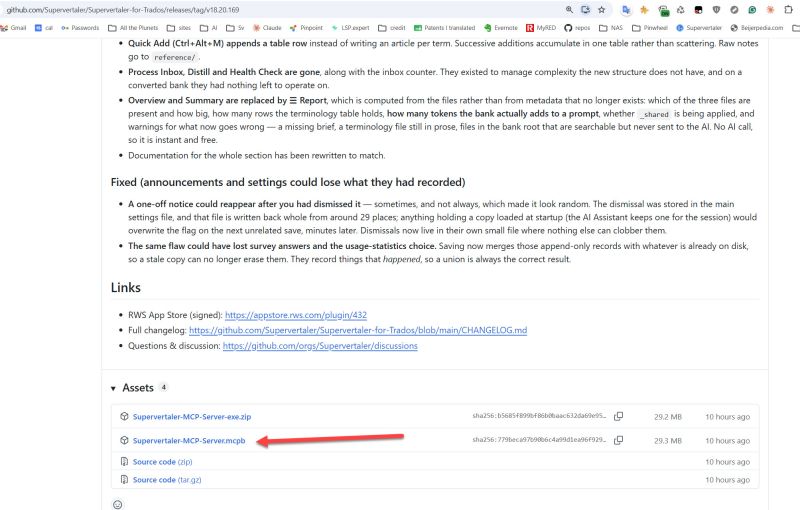
Once the Supervertaler MCP Server has been installed (docs.supervertaler.com/trados/mcp-server/), Claude has complete control of and access to my Trados Studio project. This means that I can make use of the full power of Claude Desktop, which is already an EXTREMELY powerful way of working.
I can drag reference files from elsewhere on my computer onto the Claude chat window, and then just start speaking to Claude and watching the magic happen.
An example of how I might start the conversation (remember, I don't even have to type this — I can speak it):
"I have a project similar to the one we did yesterday open in Trados.
Let's use the same style guide and termbase as yesterday.
The termbase is attached in the project.
I have also attached the client's project translation memory.
You can use it as a reference, but be careful. It contains quite a lot of garbage.
I also need you to pay extra special attention to the tags in this project. I have also attached some special instructions from the client regarding these tags as a markdown file.
Please translate the whole project carefully and have a report ready when you're done.
I'm off to the gym and I'll be back in about one or two hours.
Please work autonomously until you are finished. Also make sure to proofread your work carefully."
[Edited at 2026-08-09 23:16 GMT]
| | | | Michael Beijer
Մեծ Բրիտանիա
Local time: 07:27
Անդամ
հոլանդերեն
+ ...
TOPIC STARTER | Complete list of (49) tools already available via the Supervertaler MCP Server | Aug 9 |
There are currently 49 tools, and more are being added daily. The MCP server lets Claude see/control your live editing session – not files on disk but the actual document you have open!
See the docs for more info on what Claude can actually do in Trados: https://docs.supervertaler.com/trados/mcp-server/
Orientation
get_active_project ... See more There are currently 49 tools, and more are being added daily. The MCP server lets Claude see/control your live editing session – not files on disk but the actual document you have open!
See the docs for more info on what Claude can actually do in Trados: https://docs.supervertaler.com/trados/mcp-server/
Orientation
get_active_project — project name, language pair, active file, segment counts
get_files — the files inside a merged multi-file document
get_project_statistics — analysis bands, word counts, progress per file
list_projects — every project registered in Studio (2022/2024/2026)
get_project — details of any project without opening it
list_tms — the translation memories on this machine
list_project_templates — your Studio project templates
list_resources — the TMs and termbases this project uses
help — a menu of what you can ask
session_report — how many bytes each tool has sent
Reading the document
get_segments — list segments, filtered by status, text, file or TM match band
get_active_segment — the segment you are on, with TM matches and termbase hits
go_to_segment — move the Studio cursor to a segment
get_comments — read the Trados comments on a segment
Translation memory
search_tm — concordance-search your Supervertaler TMs
search_studio_tm — concordance-search the Studio TMs (.sdltm and GroupShare)
compare_document_to_tm — every segment that differs from what the TM already holds
pretranslate — fill untranslated segments from the TM
update_tm — write confirmed segments back to the main TM
Terminology
lookup_term — look a term up; hits are never reoriented, so you can verify
add_term — add a pair, direction-aware, targetable by name or role
update_term — edit a pair, its notes, definition or domain
delete_term — remove an entry (it confirms first)
Writing
update_segments — write translations and set statuses; lands as Draft
insert_into_active_segment — insert text into the current target
find_and_replace — tag-safe find & replace, with a preview before it applies
save_document — save the document (only when you ask)
export_target — generate the translated target files
Comments
add_comment — flag a source problem or leave a review note
update_comment — change a comment's text or severity
delete_comment — remove a comment (it confirms first)
Quality checks
run_verification — Studio's own Verify Files, results per segment
check_numbers — numbers that differ between source and target
check_tags — missing or extra inline tags; compares tag IDs, not just counts
check_terminology — segments not using the termbase's expected translation
check_nbsp — non-breaking spaces silently lost from the source
find_inconsistencies — repeated source segments translated differently
Did I actually look at it?
get_coverage — segments neither written nor reviewed this session, per match band
mark_reviewed — record that you read a segment and deliberately left it
Learning from your own corrections
get_tracked_changes — your tracked changes as (before, after) pairs: what the draft offered vs what you made it
SuperMemory
get_supermemory_context — the client decisions you have written down
search_supermemory — look up a past decision and the reasoning behind it
list_supermemory_banks — which banks exist, and which is active
Prompts
list_prompts — browse your prompt library
get_prompt — read one
save_prompt — create or update one
get_prompt_context — everything needed to write a prompt for this project
Batch tasks (these run in the background)
analyze_files — word counts and TM leverage
get_task_status — poll a running batch task
▲ Collapse
| | | | Zea_Mays
Իտալիա
Local time: 08:27
անգլերենից գերմաներեն
+ ...
Kaspars Melkis wrote:
Most interesting is that you can use simple verbal commands to control and manage Trados software instead of clicking through menus. Could it be a new way to do things? The old UI paradigm is obsolete. The future is simply asking the software to do things we want and the software does it or explains that it cannot be done and suggests ways how to do it differently!
It makes me think of those infinite-loop experiences with phone bots in customer support lines:Sorry, I didn't understand. Please repeat. 
| | | | Dan Lucas
Մեծ Բրիտանիա
Local time: 07:27
Անդամ (2014)
ճապոներենից անգլերեն
Michael Beijer wrote:
There are currently 49 tools, and more are being added daily.
Looks great. Do you access these functions through your own Studio plugin? That was the only way I found to be effective.
Dan
| | |
|
|
|
Michael Beijer
Մեծ Բրիտանիա
Local time: 07:27
Անդամ
հոլանդերեն
+ ...
TOPIC STARTER | Yes – it all runs through the plugin, inside the Studio process | Aug 10 |
Dan Lucas wrote:
Michael Beijer wrote:
There are currently 49 tools, and more are being added daily.
Looks great. Do you access these functions through your own Studio plugin? That was the only way I found to be effective.
Dan
Yes – everything goes through the plugin
There are two pieces:
• A tiny MCP server (a standalone .exe, installed into Claude for Desktop as a .mcpb extension). It speaks the MCP protocol to Claude and does nothing else – it holds no Trados logic at all.
• Supervertaler for Trados, which starts a small localhost-only HTTP bridge inside the Studio process itself. Random port, fresh bearer token per session, handshake file so the .exe can find it, and it never accepts anything but 127.0.0.1 connections.
So Claude → MCP .exe → bridge → the plugin, which is already sitting inside Studio and can call the Studio API directly, on Studio's own UI thread.
That in-process bit is the whole trick, and it's what you ran into as well: the Studio API is only really usable from inside Studio. Anything working from the outside is stuck with SDLXLIFF files on disk, which means you get a snapshot, not the session. No active segment, no live TM lookups, no termbase the project actually has attached, no comments/tracked changes as Studio sees them — and no way to write back without the user closing, you editing, and them reopening.
Going through the plugin means Claude sees the document you have open right now. When it calls go_to_segment, your cursor moves (which is kind of magical to see). When it calls update_segments, the edit appears in the grid in front of you and you can Ctrl+Z it like any other change. search_tm hits the actual TMs attached to the project. That's the difference between "an AI that processes your files" and "an AI sitting next to you in Studio", and it's why it feels the way it does.
And all of this is possible using natural language. That is, you don't need to remember any of the tool names. And of course, to make it even more fun, instead of typing in Claude Desktop's chat window, you should start dictating! And use your Talon scripts to carry out various keyboard operations in Trados Studio, by voice, or use the built-in voice commands that come with Supervertaler for Trados.
(Practical bonus of the split: the .exe is trivial and never needs Studio internals, so the 49 tools live in the plugin and I can add tools without users reinstalling the Claude Desktop side. It just re-reads the tool list from the bridge.)
Docs, if you want the gory details: https://docs.supervertaler.com/trados/mcp-server/
Michael
PS: All code written by Claude Code (Opus 5 and Fable 5). Design and blame: mine.
[Edited at 2026-08-10 11:34 GMT]
| | | | Michael Beijer
Մեծ Բրիտանիա
Local time: 07:27
Անդամ
հոլանդերեն
+ ...
TOPIC STARTER | ghost in the machine | Aug 10 |
Example of my first job of the day...
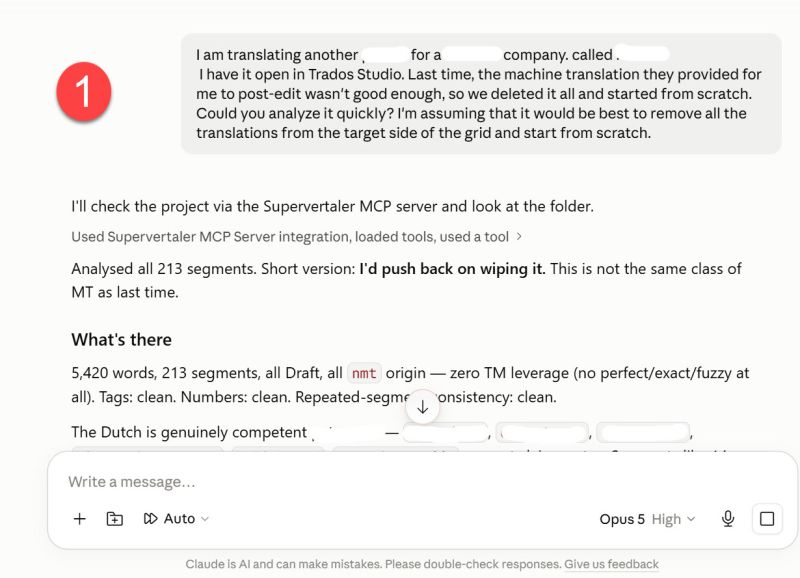
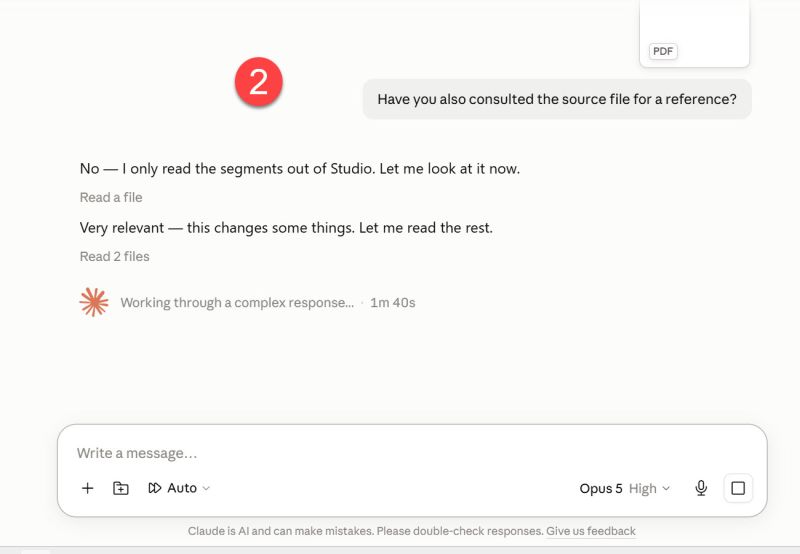
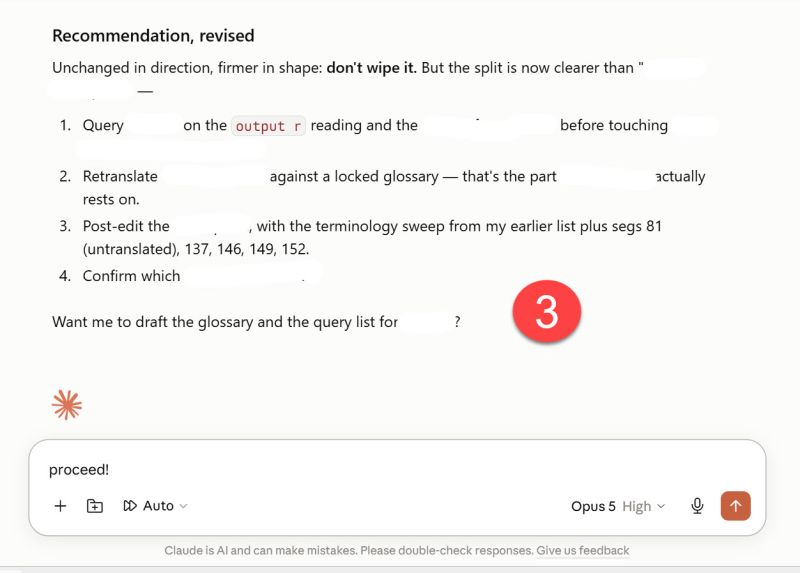
My chat input dictated with Wispr Flow. Once the MCP server starts on the actual work, I see the grid updating automatically, like magic.
PS: Incidentally, this whole workflow definitely has potential for translators with physical disabilities, like severe RSI, etc.
| | | | Michael Beijer
Մեծ Բրիտանիա
Local time: 07:27
Անդամ
հոլանդերեն
+ ...
TOPIC STARTER | As if all of this wasn't already crazy enough... | Aug 10 |
As if all of this wasn't already crazy enough, I just realised that I can communicate with Claude about the project it is currently translating in Trados Studio on my desktop computer, in the Claude Android app! Also by voice. I am currently sitting in my garden talking to Claude on my Android phone about the job it's translating for me in my office. We are definitely living in interesting times!
| | | | | Say whaaaaat????!!!! | Aug 10 |
Michael Beijer wrote:
As if all of this wasn't already crazy enough, I just realised that I can communicate with Claude about the project it is currently translating in Trados Studio on my desktop computer, in the Claude Android app! Also by voice. I am currently sitting in my garden talking to Claude on my Android phone about the job it's translating for me in my office. We are definitely living in interesting times!

| | |
|
|
|
Dan Lucas
Մեծ Բրիտանիա
Local time: 07:27
Անդամ (2014)
ճապոներենից անգլերեն
| An increasingly inclusive world | Aug 10 |
Michael Beijer wrote:
PS: Incidentally, this whole workflow definitely has potential for translators with physical disabilities, like severe RSI, etc.
Agreed, huge potential. My entire workflow is driven by voice (Talon). What I thought was a disaster two years ago, when I became unable to use Windows Notepad with Dragon Naturally Speaking after upgrading to Windows 11, turned out to be a blessing in disguise.
I had to move to Talon, which pushed me to Visual Studio Code, and thence to Cursorless, and I have implemented several of my tools as VS Code extensions - none of this would have been possible using DNS and Notepad!
Dan
PS like you I send nearly everything through a Studio plugin
[Edited at 2026-08-10 12:50 GMT]
| | | | To report site rules violations or get help, contact a site moderator: You can also contact site staff by submitting a support request » Announcing Supervertaler MCP Server: let Claude for Desktop work directly with your Trados project! | Wordfast Pro | Translation Memory Software for Any Platform
Exclusive discount for ProZ.com users!
Save over 13% when purchasing Wordfast Pro through ProZ.com. Wordfast is the world's #1 provider of platform-independent Translation Memory software. Consistently ranked the most user-friendly and highest value
Buy now! » |
| | TM-Town | Manage your TMs and Terms ... and boost your translation business
Are you ready for something fresh in the industry? TM-Town is a unique new site for you -- the freelance translator -- to store, manage and share translation memories (TMs) and glossaries...and potentially meet new clients on the basis of your prior work.
More info » |
|
| | | | X Sign in to your ProZ.com account... | | | | | |




 Login to reply/comment
